An AI gateway now sits in the request path of every model call. It decides how fast your models respond, how much provider spend you avoid through caching, routing, and token limits, and whether your agents stay inside the guardrails your security team wrote. Kong AI Gateway is a familiar name, but it was built on top of a traditional API platform, and that design shapes per-plugin processing overhead, the license needed for most AI features, and MCP support that is still maturing.
Gartner forecasts worldwide AI spending will reach $2.59 trillion in 2026, and it raised its 2026 growth outlook for AI model spending to 110%. Every one of those model calls passes through a gateway, so routing, caching, and spend caps now sit directly on the cost line. (Source: Gartner, May 2026) If you are evaluating a Kong AI Gateway alternative, this guide walks through seven options, how they compare, and how our team at Folio3 helps teams migrate route by route with a tested rollback path through our AI enablement services.
Quick answer: For the lowest latency, choose Bifrost. For open-source self-hosting, choose LiteLLM or APISIX. For audit-ready identity and spend control, add Folio3 AI Guardian on top of whichever gateway you run.
What is Kong AI Gateway
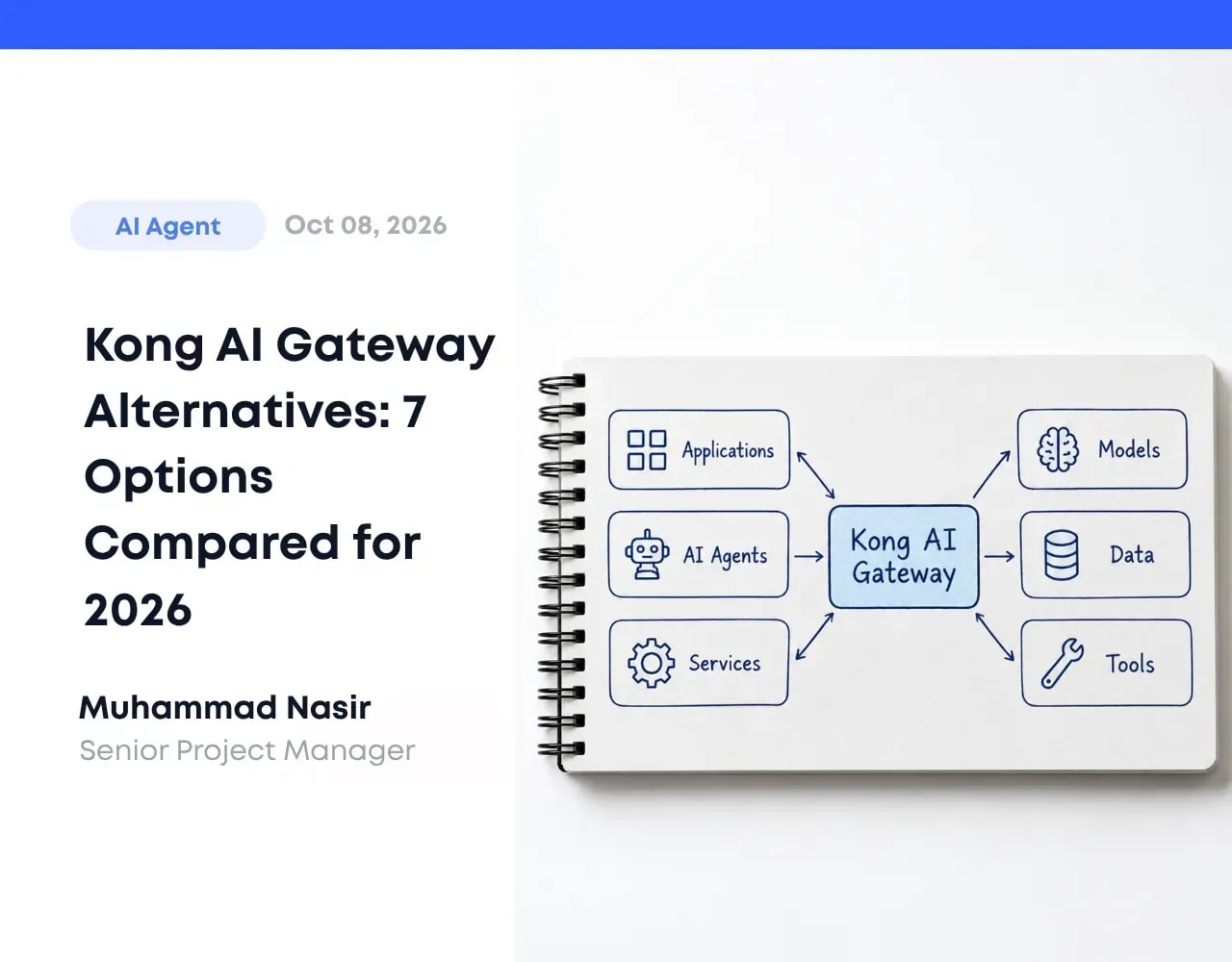
Kong AI Gateway is a set of AI plugins for Kong Gateway, whose core is open source under Apache 2.0. A small set of AI plugins is open source. The advanced plugins and the AI Gateway product need Konnect or a Gateway Enterprise license. It adds routing to providers like OpenAI, Anthropic, and Azure OpenAI, plus prompt templating, rate limiting, and observability hooks through Konnect, Kong's control plane.
How its plugin model works
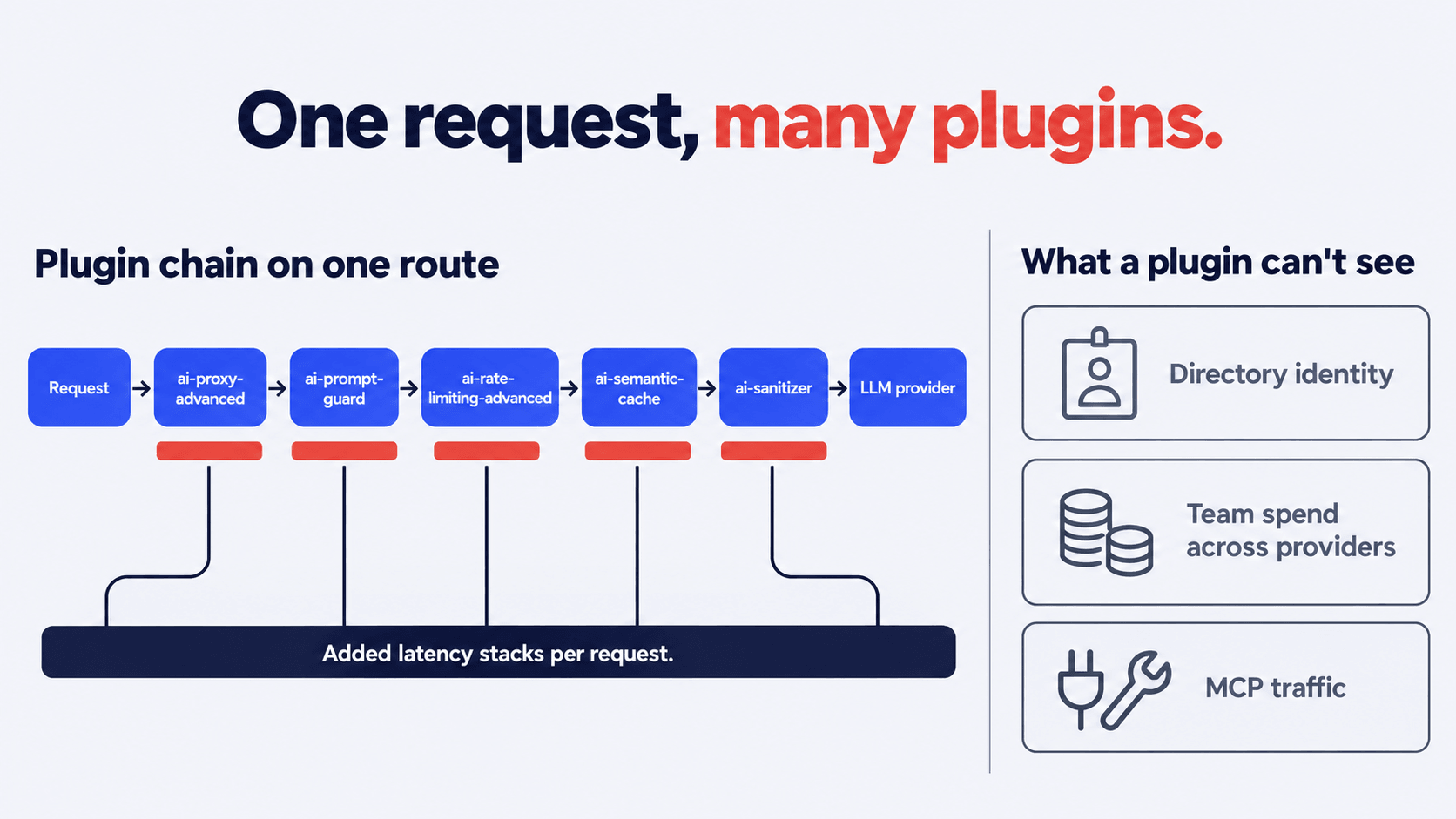
Each AI capability is a plugin scoped to a route, service, or consumer, and the plugins on a route run in priority order. A typical AI chain covers:
- Routing: ai-proxy-advanced sends traffic to OpenAI, Anthropic, or Azure OpenAI, with load balancing and fallback.
- Prompt control: ai-prompt-template and ai-prompt-guard standardize and filter prompts.
- Limits and savings: ai-rate-limiting-advanced caps tokens, and ai-semantic-cache serves repeat prompts.
- Data protection: ai-sanitizer masks sensitive data before it leaves your network.
Every plugin attached to a route runs on each request to that route, so the chain sets your latency. Light chains add little. Chains with semantic caching, external guardrails, or request transformers add extra lookups and model calls. Benchmark your own chain rather than relying on vendor numbers.
Plugins also only see one request on one route. Out of the box, the caller is a Kong Consumer. Tying calls to directory users needs the OpenID Connect plugin plus consumer mapping, and cross-provider spend reporting depends on Konnect analytics. According to Speakeasy's analysis (checked October 2026, Kong Gateway 3.13), guardrails don't apply to MCP traffic through the plugin, and the MCP plugin needs AI Gateway Enterprise.
Where it fits best
Kong AI Gateway fits when AI extends an API platform you already run:
- Your team already operates Kong at scale.
- LLM calls are a small share of total traffic.
- You mainly need routing, rate limits, and caching.
- You can budget for Konnect and Enterprise tiers.
It fits less well for AI-first workloads, regulated teams that need identity and audit depth, and MCP-heavy agent roadmaps. The AI governance maturity model helps you judge which side you're on.
Why teams seek alternatives
The pain points are specific, and they tend to show up once AI traffic becomes a large share of gateway volume.
- The plugin layer adds latency. Each AI plugin on a route runs in sequence inside the proxy, so long chains stack their overhead. Kong's own comparison page publishes benchmarks against LiteLLM and Portkey, but they are vendor-run, so reproduce them on your traffic.
- Konnect platform dependency. Analytics and central management run through Konnect, Kong's SaaS control plane, and a fully self-hosted deployment needs a separate Gateway Enterprise license.
- MCP governance gaps. Per Speakeasy, the MCP plugin needs Gateway 3.12 or higher, per-tool access controls arrive in 3.13, and the MCP registry is in tech preview. Agent-heavy teams feel this first.
- Identity is tied to Kong Consumer. The principal is a Kong Consumer, not a directory identity or an agent, so mapping calls to employees takes custom work.
- Cost scales with services and requests. On Konnect Plus, self-hosted and dedicated gateways bill per gateway service and per million API requests. Six models set up as six gateway services, with 8 million requests a month, come to about $904 before advanced analytics, as the pricing section below shows.
- Self-hosted operational load. Running Kong properly means a Postgres database or declarative config, hybrid data planes, and plugin upgrades. Plan for ongoing platform engineering time to run and upgrade it.
For a wider view on where this fits in company-wide AI risk, our write-up on AI governance and compliance readiness covers the identity, policy, and audit layer that a request proxy does not provide.
Not Sure Which AI Gateway Fits Your Stack?
Tell us about your models, security requirements, and cloud setup, and we'll help you work out whether Kong or an alternative is the better fit for your team.
Get a Free Gateway Consultation
How we evaluated alternatives
Each tool was compared on seven dimensions that decide whether a gateway holds up in production:
- Performance and latency: Overhead added per request, and whether published numbers come from independent tests or the vendor.
- Model routing: Provider coverage, failover, and load balancing.
- MCP and agent support: Registry, per-tool access control, and whether guardrails apply to MCP traffic.
- Governance and security: PII masking, output validation, and guardrails.
- Identity and audit: SSO, role-based access, directory or agent identity, and prompt-level audit trails.
- Cost controls: Token limits, spend caps per team, and budget alerts.
- Deployment and pricing: Self-hosted, private cloud, or SaaS, and whether pricing is public.
Findings come from each vendor's public documentation, pricing pages, and repositories, and vendor-run benchmarks are labeled as such. To test any shortlisted tool yourself, run the same scenario on each: 20 million tokens a day, three providers, PII redaction on inbound prompts, spend caps per team, and SSO. A capability that fails under that workload outweighs any checklist tick.
Best Kong AI Gateway alternatives
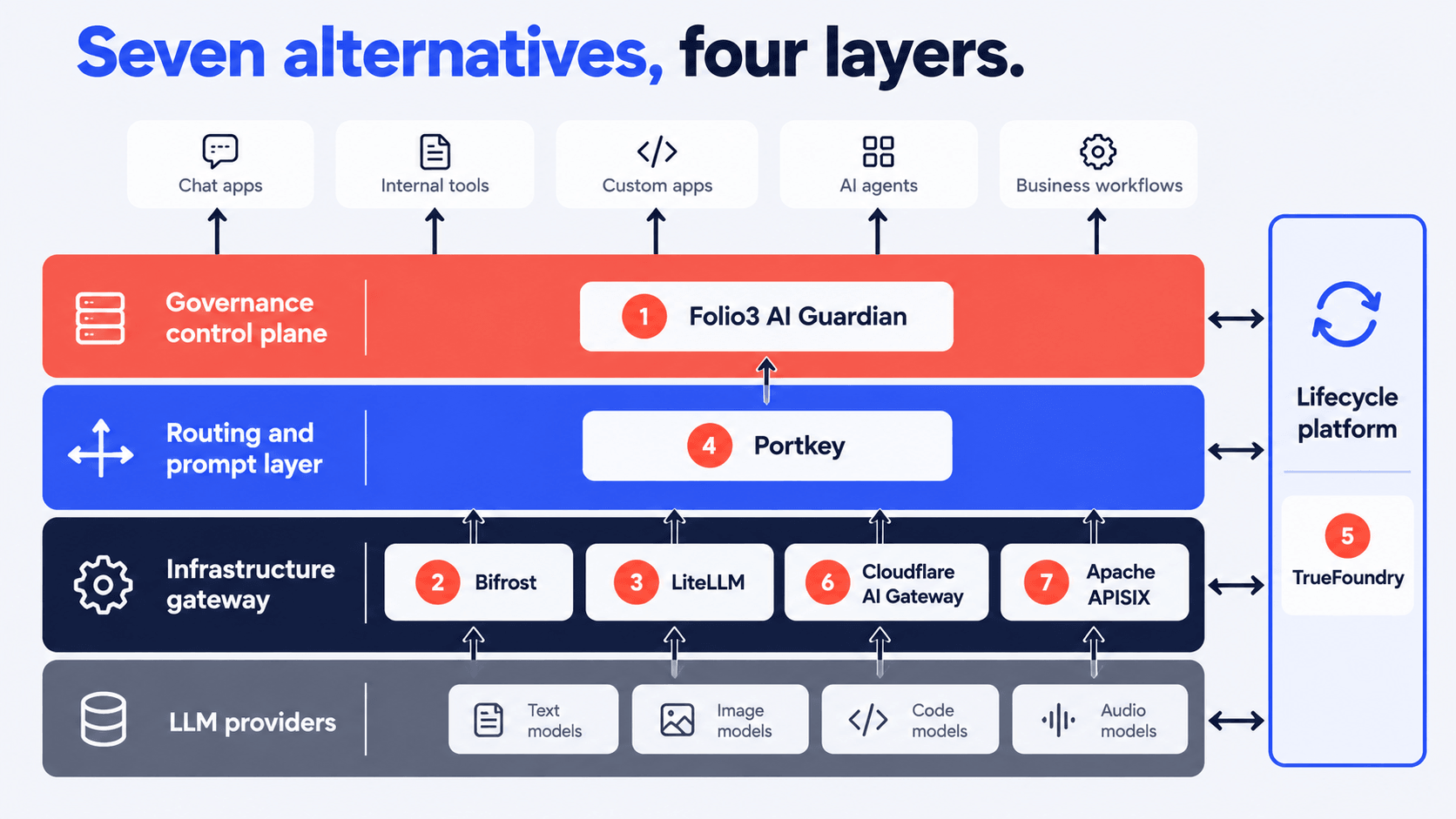
Six of the tools below replace Kong as the request proxy, and one adds governance on top of whichever proxy you keep. Each entry lists its best fit and its main limitation so you can shortlist quickly.
1. Folio3 AI Guardian: governance control plane
Folio3 AI Guardian is a governance control plane that runs alongside Kong, Bifrost, or any proxy that handles raw throughput. Employees reach approved models through Microsoft Teams, Slack, a web app, or mobile. Each request is tied to an SSO identity, scanned for PII and secrets in prompts and multi-page attachments, routed to the model approved for that role, checked against department spend caps, and logged with an identity-attributed audit trace. It deploys inside your Azure, AWS, or GCP tenant. Pricing starts at $15K for implementation plus a platform license from $8K per quarter, with final terms scoped to the rollout.
Best fit: regulated industries, companies with multiple AI vendors, and teams with shadow AI problems. AI Guardian gives employees an approved path to AI, and Shadow AI Detection surfaces the unapproved tools still in use.
Honest limitation: AI Guardian is a governance layer, not a high-throughput proxy. If your main need is raw request forwarding at edge-network speed, pair it with Bifrost, Cloudflare, or your existing Kong install. More detail on the product is on the enterprise AI gateway solution page.
Bifrost, an open-source gateway from Maxim AI, is written in Go and built for LLM traffic. Its README claims 11 microseconds of added latency at 5,000 requests per second on a t3.xlarge instance. That is a vendor-run figure, so reproduce it on your own hardware before you plan around it.
It supports MCP, failover, and load balancing across models, and an OpenAI-compatible API, so clients rarely need code changes. Governance centers on virtual keys, hierarchical budgets, and OAuth or OIDC single sign-on.
Best fit: teams where latency is a product requirement, like voice agents, real-time coding assistants, and consumer chat.
Honest limitation: policy depth stops at keys, budgets, and SSO. Confirm whether PII masking and audit reporting are covered before you assume they are.
3. LiteLLM: open-source LLM proxy
LiteLLM is a widely used open-source LLM proxy with support for over 100 providers. LiteLLM has an MIT-licensed core, and its enterprise features ship under a separate license. It runs as a Python proxy, exposes an OpenAI-shaped API, and gives you spend tracking, virtual keys, rate limiting, and an MCP gateway with key- and team-level access control.
Best fit: startups and engineering teams that want to self-host, control every detail, and avoid licensing. It is also a common first step for teams that later layer a governance product on top.
Honest limitation: SSO beyond the free user cap, audit logs, and some admin controls sit in the Enterprise tier, so check which features you need before you commit.
4. Portkey: AI-native routing layer
Portkey was built for LLM traffic from day one. It gives you a unified API across 1,600+ models (Portkey's own figure), prompt versioning, semantic caching, retries, fallbacks, and per-request cost tracking. Its MCP gateway adds role-based access, OAuth 2.1, guardrails, and audit logs for tool calls. It deploys as managed cloud or self-hosted, which helps teams with data residency needs.
Best fit: product teams running multi-model stacks who want prompt management and routing in one place.
Honest limitation: if you also need to govern non-AI APIs, Portkey will not replace your traditional gateway.
TrueFoundry extends past the gateway into model deployment, fine-tuning, and evaluation. The gateway piece handles routing, rate limiting, and spend controls. The platform around it handles training runs, model serving, and evaluation harnesses.
Best fit: teams building and deploying their own models alongside using commercial APIs, where the gateway is one piece of a larger MLOps picture. For reference on how multi-model stacks evolve, our note on companies that build multi-agent systems covers typical architectures.
Honest limitation: It is more platform than a team that only needs a proxy will use.
6. Cloudflare AI Gateway: lightweight SaaS option
Cloudflare AI Gateway runs on Cloudflare's edge. You change a base URL, and your calls route through it, picking up caching, analytics, rate limiting, spend limits, guardrails, and data loss prevention, as listed in Cloudflare's docs. It is available on all plans.
Best fit: teams that already use Cloudflare, want to start in an afternoon, and need caching plus basic controls more than deep governance.
Honest limitation: it runs only as Cloudflare's hosted service, and MCP access controls sit in Cloudflare's Zero Trust products, not in AI Gateway itself.
7. Apache APISIX: Kubernetes-native gateway
APISIX is an Apache 2.0 API gateway with 100+ plugins, including AI plugins for proxying (ai-proxy, ai-proxy-multi), rate limiting, prompt guarding, and caching. It runs well on Kubernetes and uses etcd for configuration.
Best fit: platform teams that want an open-source Kong replacement for both API and AI traffic, with no licensing attached.
Honest limitation: authorization, tool selection, and agent orchestration stay in your application stack, and the built-in prompt guard is regex-based.
Expert insight
"A plugin chain can route, cache, and rate-limit a request, but it can't tell you who an agent was acting for. When an auditor asks which person, model, prompt, and budget sat behind a call, the answer has to come from an identity and policy layer above the proxy. We settle that layer first, then choose the gateway."
Abdul Sami
Head of AI Development, Folio3 AI
Kong AI Gateway pricing: where costs scale
Kong publishes Konnect pricing, but the AI Gateway bill depends on how many gateway services you run and how many requests pass through them. AI Gateway itself is listed as included on every Konnect Plus deployment type. These figures are from Kong's pricing page, checked October 7, 2026.
Cost driver | Serverless | Self-hosted / K8S | Dedicated Cloud |
AI Gateway | Included | Included | Included |
Gateway services | Included | $105/month per service | $105/month per service |
API requests | $20 for the first 1M | $34.25 per 1M | $34.25 per 1M |
Network | Included | Self-managed | $1/hour |
Compute | Included | Self-managed | 0.05–0.80/hour |
Bandwidth | Included | Self-managed | $0.15 per GB |
Advanced analytics | +$20 per 1M requests | +$20 per 1M requests | +$20 per 1M requests |
Worked example. A team runs a self-hosted (hybrid) gateway with six models, each exposed as its own gateway service, and 8 million requests a month:
Line item | Calculation | Monthly cost |
Gateway services | 6 × $105 | $630 |
API requests | 8M × $34.25 per 1M | $274 |
Total | Sum of the two lines above | about $904 |
Optional: Advanced analytics | 8M × $20 per 1M | +$160 |
What the headline hides
- Service count is the main driver. In this example, gateway services make up about 70% of the bill. Routing all six models through a single service would cut the total to about $379, so how you structure services matters as much as traffic.
- Requests scale linearly. Every additional million requests adds $34.25 on self-hosted or dedicated gateways.
- Analytics costs extra. Advanced Analytics adds $20 per million requests on top of the request fee.
- Dedicated cloud adds infrastructure. Network is billed at $1 per hour, compute at $0.05 to $0.80 per hour, and bandwidth at $0.15 per GB.
- Enterprise is custom-priced. Enterprise tiers add SLA-backed support, professional services, and volume discounts, with gateway services starting at $210 and requests at $25 per million.
To see how gateway fees fit into a wider AI budget, read our breakdown of AI implementation costs.
Kong alternatives compared
Tool | Routing | MCP support | Governance | Self-hosted | Pricing model |
Kong AI Gateway | Yes | Partial, Enterprise plugin | Plugin chain | Yes, with Gateway Enterprise license | Per gateway service + per 1M requests |
Folio3 AI Guardian | Role-based model routing | Agent registry; MCP policy not listed | SSO, PII masking, spend caps, audit | Private cloud | From $15K setup + from $8K/quarter license |
Bifrost | Yes | Yes | Virtual keys, budgets, SSO | Yes | Open-source (Apache 2.0), Enterprise tier |
LiteLLM | Yes, 100+ providers | Yes, key and team access | Keys, spend tracking, basic guardrails | Yes | Open-source (MIT core), Enterprise tier |
Portkey | Yes, 1,600+ models | Yes, RBAC and audit logs | Prompt, cache, guardrails | Yes | Usage-based |
TrueFoundry | Yes | Yes | Full lifecycle | Yes | Platform contract |
Cloudflare AI Gateway | Major providers | Via Zero Trust products, not AI Gateway | Caching, guardrails, DLP | No | Available on all plans, usage-based |
APISIX | Yes | Not listed in AI docs | Plugin chain | Yes | Open-source |
How to choose a Kong AI Gateway alternative
The choice gets easier once you decide which category of tool you need, then check three constraints.
Step 1: Pick the category
Category | What it does | Examples | Choose it when |
Infrastructure gateway | Routes, load-balances, caches, and fails over requests | Bifrost, APISIX, LiteLLM, Cloudflare AI Gateway | Latency and throughput are the main concerns |
Governance control plane | Sets policy, identity, PII masking, spend caps, and audit trails | Folio3 AI Guardian | Security, legal, or finance must answer for AI usage |
Lifecycle platform | Adds model deployment, fine-tuning, and evaluation to the gateway | TrueFoundry | You build and serve your own models |
Routing and prompt layer | Unifies providers and adds prompt versioning and observability | Portkey | Product teams run multi-model stacks |
Most mature stacks combine two of these, such as a fast proxy with a control plane above it.
Step 2: Check three constraints
- Data residency: If prompts can't leave your VPC, SaaS-only options drop off.
- APIs or agents: If the workload is mostly MCP and agents, prioritize real MCP policy support: per-tool access control, guardrails on MCP traffic, and agent identity.
- Vendor neutrality: If you want an exit path, open-source cores like LiteLLM and APISIX avoid lock-in.
Quick fit guide
- Latency-critical, such as voice or real-time assistants: Bifrost.
- Open-source and self-hosted: LiteLLM or APISIX.
- Audit-ready governance and spend control: Folio3 AI Guardian, on top of your chosen gateway.
- Own models plus commercial APIs: TrueFoundry.
- Fast start on an existing Cloudflare setup: Cloudflare AI Gateway.
Who should stay on Kong?
Staying is reasonable if all four of these hold:
- Kong is already your API gateway.
- Your team knows the plugin model.
- AI traffic is a modest share of total requests.
- You don't need directory identity or MCP governance yet.
Start looking when AI becomes the dominant workload, when the Konnect bill grows faster than traffic, or when governance outgrows what plugins can enforce.
How to migrate off Kong AI Gateway
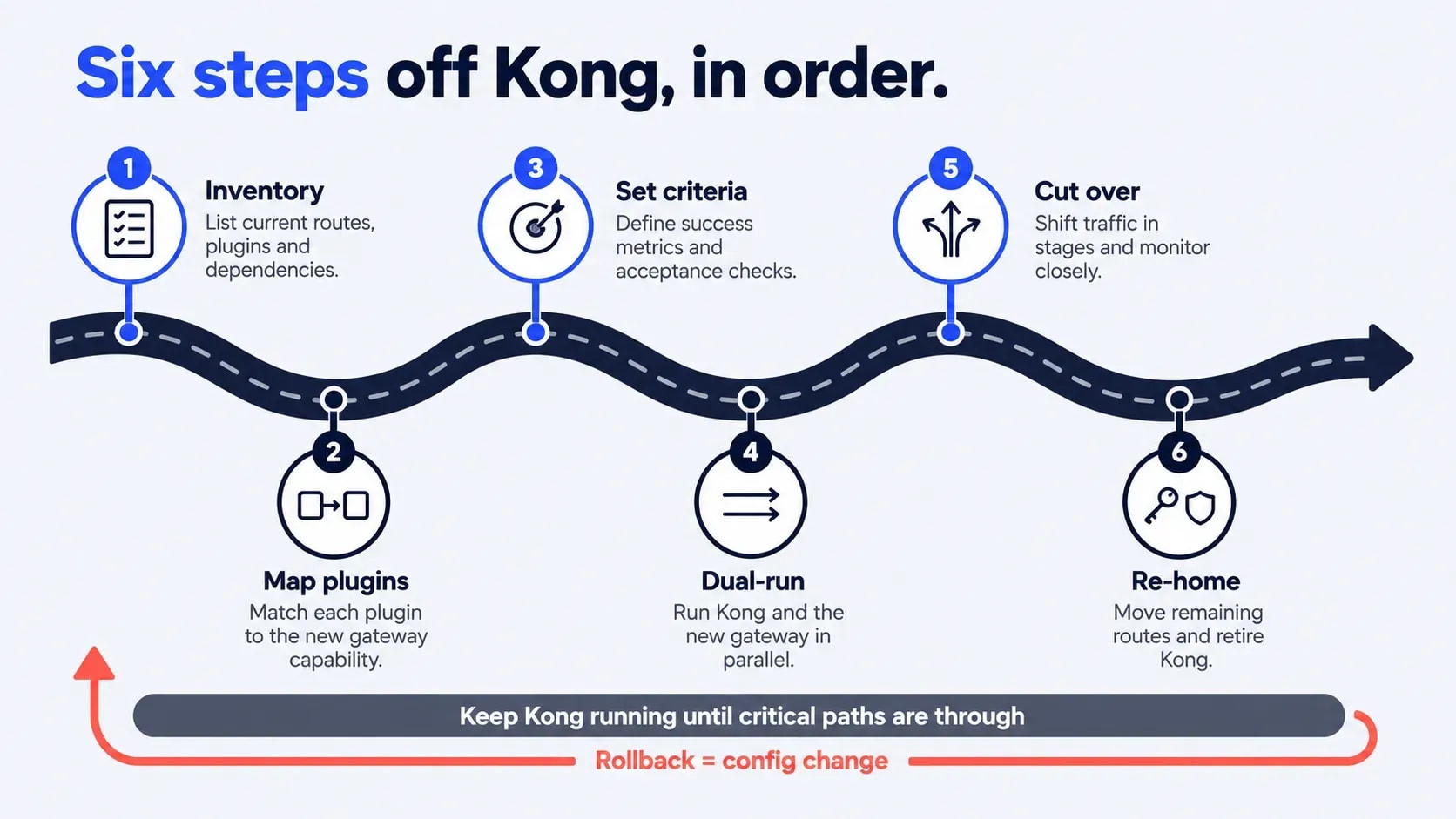
Migrations stall when teams move traffic before they know what Kong is doing for them. Work through these six steps in order.
Step 1: Inventory what Kong does today
Export your Kong configuration (decK works for this) and pair it with Konnect analytics, so you see what is configured and what carries real traffic. For each AI route, record:
- Plugins and order: Which plugins run on the route, and in what order.
- Consumers and keys: Who calls it, and which provider keys sit behind it.
- Limits: Token and request limits, and who set them.
- Owner and traffic: The team that owns the route and its request volume.
Then label each item as portable, needs rebuilding, or can be dropped. Rate limiting and prompt templates usually map cleanly to a new tool. Sanitization, guardrails, and audit logging need more thought, because teams often forget they depend on them until the cutover.
Step 2: Map each plugin to its replacement
Build a simple table with three columns: Kong plugin, what it does, and the equivalent in the target gateway. A starting point:
Kong plugin | What it does | Look for in the target |
ai-proxy-advanced | Routing, load balancing, fallback | Provider routing and failover rules |
ai-prompt-template | Standard prompt formats | Prompt templates or versioning |
ai-rate-limiting-advanced | Token limits | Token limits and per-team budgets |
ai-semantic-cache | Serves repeat prompts | Semantic or exact-match caching |
ai-sanitizer | Masks sensitive data | PII masking before the provider call |
Kong Consumer | Caller identity | Virtual key, SSO user, or service account |
Mark gaps early, such as identity, MCP policy, or semantic caching. A gap may mean adding a second tool, not swapping one.
Step 3: Set success criteria
Agree on pass or fail numbers before testing: p95 latency, error rate, cost per million tokens, and guardrail catch rate. Capture Kong's baseline on the same routes first, then define each criterion against it, for example, "p95 latency no worse than Kong's baseline." Test guardrails on a labeled set of real prompts, including ones that should be blocked. Without agreed numbers, the dual-run ends in opinions.
Step 4: Dual-run on your own traffic
Use public benchmarks to build the shortlist, then decide on your own traffic. Mirror a small slice of production to the new gateway for about a week, and compare latency, errors, and the bill against Kong. Three details catch teams out:
- Mirrored calls cost tokens. Provider spend rises for the slice, so budget for it.
- Skip side effects. Don't mirror tool calls that write data or trigger actions, such as MCP tools.
- Test the awkward cases. Check streaming responses, long prompts, timeouts, retries, and header passthrough.
Step 5: Cut over route by route
Start with the least sensitive route and watch error rates and p95 latency for 48 hours. Then move to the next route. Set the rollback trigger before you start, such as an error rate or latency threshold that sends traffic back to Kong. Freeze plugin changes on Kong during the migration, so the baseline stays comparable. Keep Kong running until the critical paths are through, so rollback is a config change.
Step 6: Re-home keys, budgets, and guardrails
- Rotate provider keys so nothing still points at the old proxy.
- Rebuild per-team spend caps and alerts.
- Test guardrails against your real prompt set, not synthetic data. Our note on whether AI can go rogue covers failure modes worth testing.
- Decommission Kong only after a full billing cycle with no traffic on it.
How Folio3 AI can help
Kong covers routing, caching, and rate limits. Most teams leaving it also need governance on top: who called which model, with what data, under which budget. That's the job of Folio3 AI Guardian, Folio3's governance control plane for company-wide AI use. It works alongside whichever gateway you run, so you can adopt it before, during, or after a migration.
What AI Guardian covers
- Identity and access: SSO and role-based access, so every call ties to a real user or agent.
- Data protection: PII masking before prompts leave your network, including redaction in multi-page files.
- Cost control: Role-based model routing and spend caps per team.
- Audit trail: A record of who used which model and when, ready for reviews.
- Deployment: Private cloud on Azure, AWS, or GCP, so data stays in your environment.
How we work with you
- Review: Folio3 maps your current gateway setup, plugins, and policy gaps.
- Plan: The team designs the target setup and the cutover sequence.
- Rollout: AI Guardian is deployed, and teams move over in stages. After requirements sessions, configuration and deployment typically take four to five business days, depending on the number of LOBs, policies, and integrations.
With 20+ years in business and 950+ projects delivered, Folio3 will give you a straight answer on whether you need a replacement or just a governance layer on top. To see it working, book an AI Guardian demo, or contact us for a short scoping call. Scoping requests get a same-day response.
Looking for a Kong Alternative Built for AI Governance?
See how AI Guardian adds identity-based access, sensitive data masking, and a full audit trail to every AI request, deployed inside your own Azure or AWS environment.
Book an AI Guardian Demo
The bottom line
Kong AI Gateway works well when AI is a side workload on an API platform you already run. It strains when AI becomes the main workload, when MCP governance matters, or when the Konnect bill grows faster than your traffic. At that point, one of the six replacements above, or a governance layer on top, probably fits better. Decide first whether you need speed, governance, or lifecycle coverage, and the shortlist narrows to two or three tools.
FAQs
What is the best Kong AI Gateway alternative?
The best choice depends on the workload: Bifrost for latency, LiteLLM or APISIX for open-source self-hosting, and Portkey for prompt management. Teams that need audit-ready identity and spend control add Folio3 AI Guardian on top of their chosen gateway.
Is Kong AI Gateway open source?
Kong Gateway's core and a few AI plugins are open source under Apache 2.0. The full AI Gateway product, including advanced plugins and MCP features, needs Konnect or a Gateway Enterprise license.
Is Kong AI Gateway good for MCP traffic?
It is workable but incomplete. Per Speakeasy's analysis (checked October 2026), guardrails do not apply to MCP traffic through the plugin; the MCP plugin requires Enterprise, and the registry is in tech preview. If MCP is central to your roadmap, look at tools with native MCP policy support.
What is a good open-source Kong alternative?
LiteLLM for an LLM-specific proxy, Bifrost for low-latency routing, APISIX for a general-purpose Kubernetes-native gateway. All three are open source and have public repositories.
How is Folio3 AI Guardian different from Kong AI Gateway?
Kong is a proxy with AI plugins. AI Guardian is a governance control plane that handles PII masking, spend caps, identity, and audit alongside the gateway you already run, including Kong.
Are Kong AI Gateway alternatives cheaper at scale?
They can be, because open-source options remove license fees and AI-native tools avoid per-service billing. The savings shift to engineering time, so compare total cost on your own traffic.
How much does Kong AI Gateway cost?
AI Gateway is included on Konnect Plus. Self-hosted and dedicated gateways cost $105 per month per gateway service plus $34.25 per million requests, serverless charges $20 for the first million requests, and Enterprise plans are custom-priced.
Can I migrate off Kong AI Gateway without downtime?
In most cases, yes. Mirror traffic, cut over one route at a time, and keep Kong running as the rollback target until critical paths are through.